
DSP Audio Filter1.43 - Google Play
You'll be able to see results in few seconds.
Publisher Description

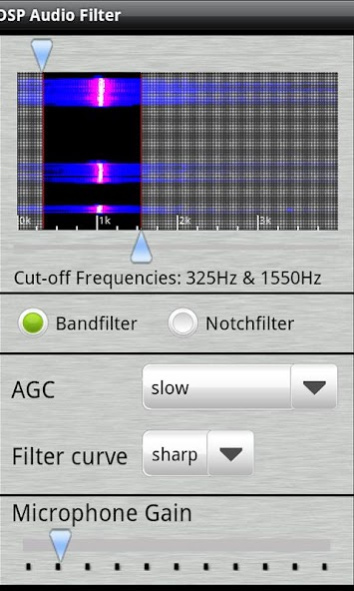
The DSP Audio Filter is a tool that enables you to filter frequencies from an audio spectrum by using your cell phone’s microphone.
This app was originally programmed for Ham Radio (Amateur Radio) operators to remove unwanted background noise and improve SSB and CW signals (Morse Code) but it can be used in different other ways.
For Example:
-Bird watchers can use it to filter out higher frequencies and eliminate street noise or other disturbing low frequencies.
-Musicians can filter out a spectrum of specific instruments.
The DSP Audio filter uses a freely adjustable lowpass and highpass filter which allows you to select specific filter frequencies and bandwidths. A waterfall visually displays the incoming audio spectrum to better identify the wanted or unwanted frequencies. You must use a headphone to avoid feedback effects.
Ham Radio Operator’s: Just place your phone’s microphone close to your radio’s speaker and listen to clear audio in your headphone.
How to use:
DSP Audio Filter uses a waterfall to display the incoming frequency spectrum. With 2 sliders the cut-off frequencies can be adjust. The areas which are covered by a grey blurry layer are cut out and they will not be passed through to the headphone. All other areas will pass the filter.
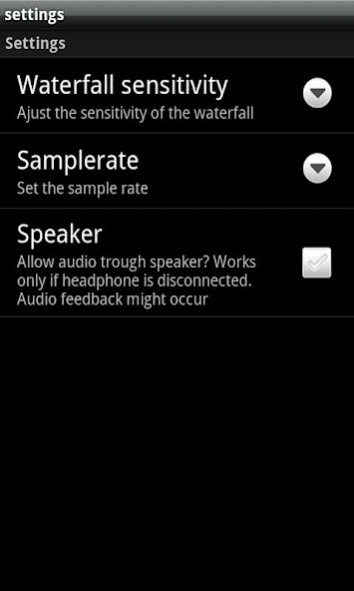
The DSP Audio Filter can be used with 4 different sampling rates (22050Hz, 16000Hz, 11025Hz and 8000Hz) which can be set in the settings menu. Unfortunately not all devices support those sampling rates. The DSP Audio Filter will check for the supported sampling rates and only allows the selection of the supported sampling rates.
For any question please visit our new forum at http://www.wolphi.com/forum/
This is the first version of the DSP Audio Filter.It has been tested on several Android devices and has performed very well. However, since we are not able to test the performance on all 150+ Android devices it might not work on some devices. If the DSP Audio Filter doesn’t work on your device you can uninstall it within 15 minutes for a full refund (this is the time frame given by Google and I am not able to change it). If the 15 minutes passes and you are not happy with the DSP Audio Filter, email me as soon as possible at info@wolphi.com. Please include your name and the model of your phone in the email. I will then refund you the money. It is important that you include the model of your device. I will try to find the cause for the malfunction or include your phone model in a list of “not working” devices.
About DSP Audio Filter
The company that develops DSP Audio Filter is Wolphi LLC. The latest version released by its developer is 1.43.
To install DSP Audio Filter on your Android device, just click the green Continue To App button above to start the installation process. The app is listed on our website since 2017-02-26 and was downloaded 0 times. We have already checked if the download link is safe, however for your own protection we recommend that you scan the downloaded app with your antivirus. Your antivirus may detect the DSP Audio Filter as malware as malware if the download link to com.wolphi.filter is broken.
How to install DSP Audio Filter on your Android device:
- Click on the Continue To App button on our website. This will redirect you to Google Play.
- Once the DSP Audio Filter is shown in the Google Play listing of your Android device, you can start its download and installation. Tap on the Install button located below the search bar and to the right of the app icon.
- A pop-up window with the permissions required by DSP Audio Filter will be shown. Click on Accept to continue the process.
- DSP Audio Filter will be downloaded onto your device, displaying a progress. Once the download completes, the installation will start and you'll get a notification after the installation is finished.
Program Details
System requirements
Download information
Pricing
Version History
version 1.43
posted on 2017-02-26
added privacy policy
version 1.41
posted on 2013-08-03
filtered spectrum can now be adjusted with a fixed bandwidth by moving the shaded area across the waterfall
Disclaimer
Official Google Play Link
We do not host DSP Audio Filter on our servers. We did not scan it for viruses, adware, spyware or other type of malware. This app is hosted by Google and passed their terms and conditions to be listed there. We recommend caution when installing it.
The Google Play link for DSP Audio Filter is provided to you by apps112.com without any warranties, representations or guarantees of any kind, so access it at your own risk.
If you have questions regarding this particular app contact the publisher directly. For questions about the functionalities of apps112.com contact us.
